BugSmash Review: Eliminate feedback chaos 😍
Disclosure: This article contains affiliate links. If you make a purchase through these links, I may earn a commission at no extra cost to you.
BugSmash Review
Tool: BugSmash
Latest LTD Link: Get the Deal
Extra Discount Link: Claim 10% Extra Discount with AppSumo Plus
👍 Purpose of the tool
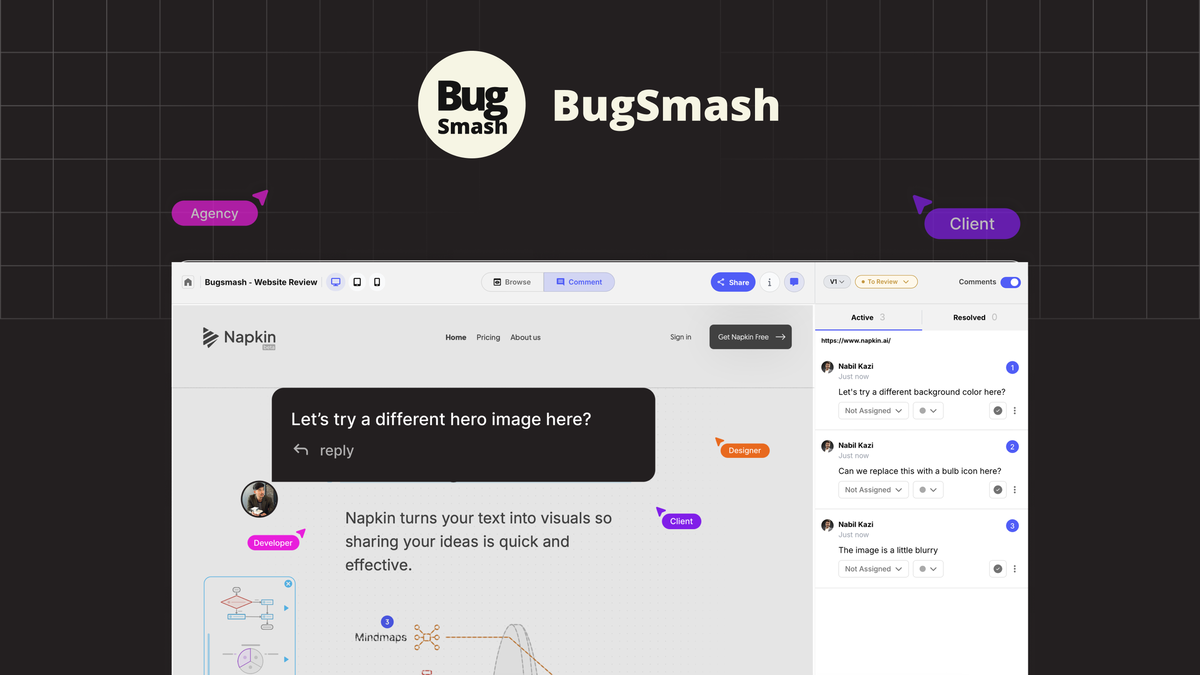
BugSmash is designed to eliminate "feedback chaos" by serving as a universal feedback layer for the internet. It helps creative and development teams collect clear, contextual feedback from clients and stakeholders without the need for endless email threads or confusing screenshots. Whether it's a live website, a PDF, a video, or even a mobile app, BugSmash centralizes all reviews into one actionable hub, speeding up approvals and reducing rework.
💪 Unique Features
- No-Login Guest Commenting: Clients can leave precise, visual feedback via a simple shareable link without ever creating an account.
- Multi-Format Mastery: Annotate live websites, dynamic web apps (React/Vue/Angular), PDFs, videos, audio files, and images all in one place.
- AI-Powered Reviews: Use AI to perform instant accessibility and UI/UX audits to catch errors before the client even sees the build.
- Version Control: Manage different versions of files while keeping previous feedback intact to track changes across revisions.
- Mobile App Feedback: A dedicated mobile app allows users to review and annotate mobile applications directly from their devices.
✔️ Use Cases
- Web Design Agencies: Get pixel-perfect feedback on live websites and prototypes from clients.
- Marketing Teams: Review ad copies, social media graphics, and marketing videos in one centralized location.
- Product Managers: Coordinate feedback between stakeholders and development teams to turn comments into Jira tickets.
- Freelancers: Simplify the client approval process for any digital asset, from PDFs to audio files.
- App Developers: Collect visual bug reports and feature requests for both web and mobile applications.
💳 Who Should Buy?
- Web Designers & Developers
- Marketing Agencies
- Product Managers
- Freelance Creatives
- Quality Assurance (QA) Teams
- SaaS Founders
- Project Managers
💪 Alternatives to
- Atarim
- MarkUp.io
- BugHerd
- Pastel
- FileStage
⚙️ Integrations
- Slack
- Jira
- Zapier
- ClickUp
- Trello
- GitHub
- Monday.com
📖 Features
- Annotate Anything: Capture feedback on live websites just by entering a URL. You can also upload videos, PDFs, images, and audio files for review.
- Full Context Feedback: Stakeholders can add comments anywhere on the page, and the tool automatically captures screenshots and technical context (like browser version) for developers.
- Threaded Replies & Private Comments: Keep communication organized with threaded discussions and use private mode for internal team notes that clients can't see.
- Robust Versioning: Upload new versions of files and compare them side-by-side (visual diff) while maintaining the history of previous comments.
- Task Management Integration: Sync feedback directly with tools like Jira or Slack to turn client comments into trackable tasks instantly.
- Custom Branding (Tier 3): Personalize the review experience for your clients with your own logo, brand name, and a custom subdomain.
- Browser Extension: Use the Chrome extension to initiate reviews, capture annotations, and even record screen recordings from anywhere on the web.
- Figma Plugin: Seamlessly bridge the gap between design and review by bringing BugSmash into your Figma workflow.
- Comment Pausing & File Status: Control the review flow by pausing comments when you're working and tagging files with statuses like "Approved" or "In Progress."
- Unlimited Guest Reviewers: Invite as many external stakeholders as you need without worrying about per-user fees or account creation hurdles.
📽 Product Demo
😛 Pros
- Zero Friction for Clients: The "no-login" feature is a massive time-saver and reduces client resistance to giving feedback.
- Centralized Hub: Gone are the days of hunting through emails and WhatsApp for that one specific layout change request.
- Detailed Context: Automatically giving developers technical info (OS, browser, etc.) eliminates the "I can't reproduce this" problem.
- Versatile Support: It's rare to find a tool that handles live websites AND mobile apps AND videos so effectively.
- Affordable Lifetime Deal: For a one-time payment, you get a powerful tool that replaces several expensive monthly subscriptions.
🤩 What I Personally Liked
- The AI-powered audit feature is a game-changer for catching low-hanging fruit in UI/UX before presenting to a client.
- The mobile app feedback flow is incredibly smooth compared to traditional desktop-only annotation tools.
- Visual diff view makes it incredibly easy to see exactly what changed between version 1 and version 2.
🙏 Cons?
- AI Credit Limits: Depending on your tier, you might run out of AI review credits if you rely on them heavily for every project.
- Learning Advanced Features: While basic annotation is easy, setting up complex workflows with Jira/Zapier takes a bit of initial effort.
- Custom Branding Tier: It’s a bit of a bummer that custom branding is locked behind Tier 3, though it makes sense for larger agencies.
🙏 What I Did Not Like
- Custom branding is only available for Tier 3 users.
- The AI audit is credit-based, which might feel restrictive for high-volume users.
💯 Pricing and Plans
BugSmash offers three license tiers with lifetime access:
- License Tier 1: $79 for 75 projects, 2 team members, 20GB storage, and 5 AI reviews.
- License Tier 2: $199 for 250 projects, 10 team members, 50GB storage, and 20 AI reviews.
- License Tier 3: $299 for Unlimited projects and members, 250GB storage, 100 AI reviews, and Custom Branding.
All plans include a 60-day money-back guarantee, ensuring you can test it thoroughly with your actual client workflow.
😎 Consider Before Buying
- Team Size: If you have more than 10 internal team members, Tier 3 is the clear winner since it offers unlimited seats.
- Client Volume: 75 projects (Tier 1) might be enough for freelancers, but agencies will quickly need the 250 or unlimited projects.
- Workflow Maturity: If you already use Jira or Slack, the integrations here will provide the most value by automating task creation.
🖌 How will I Use this?
- Send no-login links to clients for quick website sign-offs.
- Use the AI audit to check accessibility on new dev builds.
- Record screen annotations via the browser extension to explain complex bugs.
- Manage versioning for PDF design assets to track client revision requests.
- Integrate with Slack to get instant notifications when a client leaves a comment.
😀 Final Verdict
BugSmash is a robust, well-thought-out feedback OS that directly addresses the pain points of modern design and dev teams. It’s more than just an annotation tool; it’s a communication bridge that saves time and sanity. If you're tired of feedback chaos, this is a must-have.
Would I recommend it? Totally. 🚀